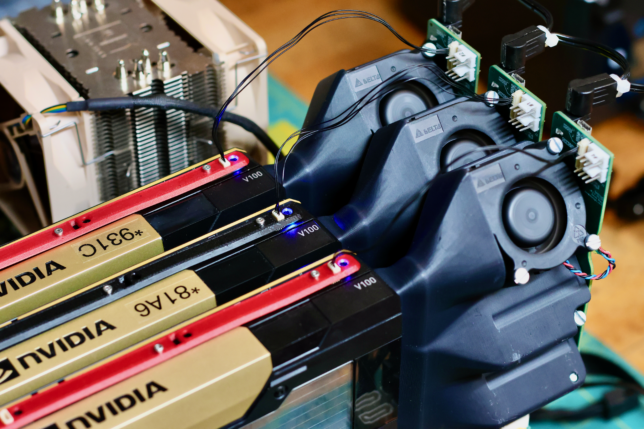
The critical finding last time was that: in this world of decommissioned enterprise hardware, three and four GPU setups are counter-intuitively durable against diminishing returns. Within a homelab GPU appliance, you can just keep adding GPUs to proportionally scale performance. Given the low cost of older ~16GB GPUs, this puts LLMs larger than the ~10B parameter single GPU models within reach for a local daily driver.
To better understand how multiple GPUs handle diverse workloads, I’ve expanded our benchmarking tool with over 130 new tests tailored for LLMs. Following requests from commenters, I also integrated power consumption monitoring to compare efficiency across different builds. Detailed results and analysis to follow.
To reiterate: these cards are cheap because they run hot and ship without cooling, a non-starter for the typical secondary market customer. The project underwriting all this research has been my standalone active cooler, which is almost ready for release. If you’re interested in helping push it over the line by stress testing a sample, I’ll be recruiting beta testers using the mailing list.
New Tests and Power Consumption
The benchmarking suite at the heart of this project, gpu_box_benchmark got a major update to facilitate this analysis. Individual tests were added to get generation speeds with common quants (Q4, Q8, F16) and context depths (4k, 32k, 64k, 128k) for the following models:
- Qwen 2.5 Instruct: 3B, 14B, 32B, 72B
- Gemma 4: 8B, 12B, 26B, 31B
- Qwen 3.6: 27B, 35B
Additionally, I added tests to check the max number of parameters that can fit on a given build varying the context depth, and tests to see the effects of using llama.cpp’s tensor split mode. All parameters aren’t equal, but this is a good point of comparison.
Results
Unlike last time (vary cpu, vary motherboard), this round of benchmarking holds motherboard and CPU constant across all runs. The motherboard is the Supermicro X10DRG-Q, and the CPUs are 2x E5-2687W 12-Core intel CPUs.
For GPUs, I ran the full suite on nine different hardware configurations:
- 1-3 K80s (2-6 logical cores)
- 1-3 P100s
- 1-3 V100-16GB
The collection of hardware I have at my disposal for this testing has been slowly accumulated over time. My price per build isn’t 100% reflective of what you could find on eBay today. This is what I paid for the components:
- Corsair HX1500i PSU: $147.70
- Supermicro X10DRG-Q Motherboard: $211
- E5-2687W CPU: $28.20 ea
- Tesla K80: $90 ea
- Tesla P100: $134.50 ea
- Tesla V100-16GB: $436.77 for lot of 2
These prices result in rough BOM costs for the different builds benchmarked below:
| GPU (3x) | Approx. Total Cost |
|---|---|
| Tesla K80 | $657 |
| Tesla P100 | $790 |
| Tesla V100-16GB | $1,042 |
Max Model Parameters
Before we get into throughput I would like to initially point out something interesting related to model size. This test works by trying to load progressively larger LLMs onto the GPUs and records the max sized model that is able to produce any output tokens.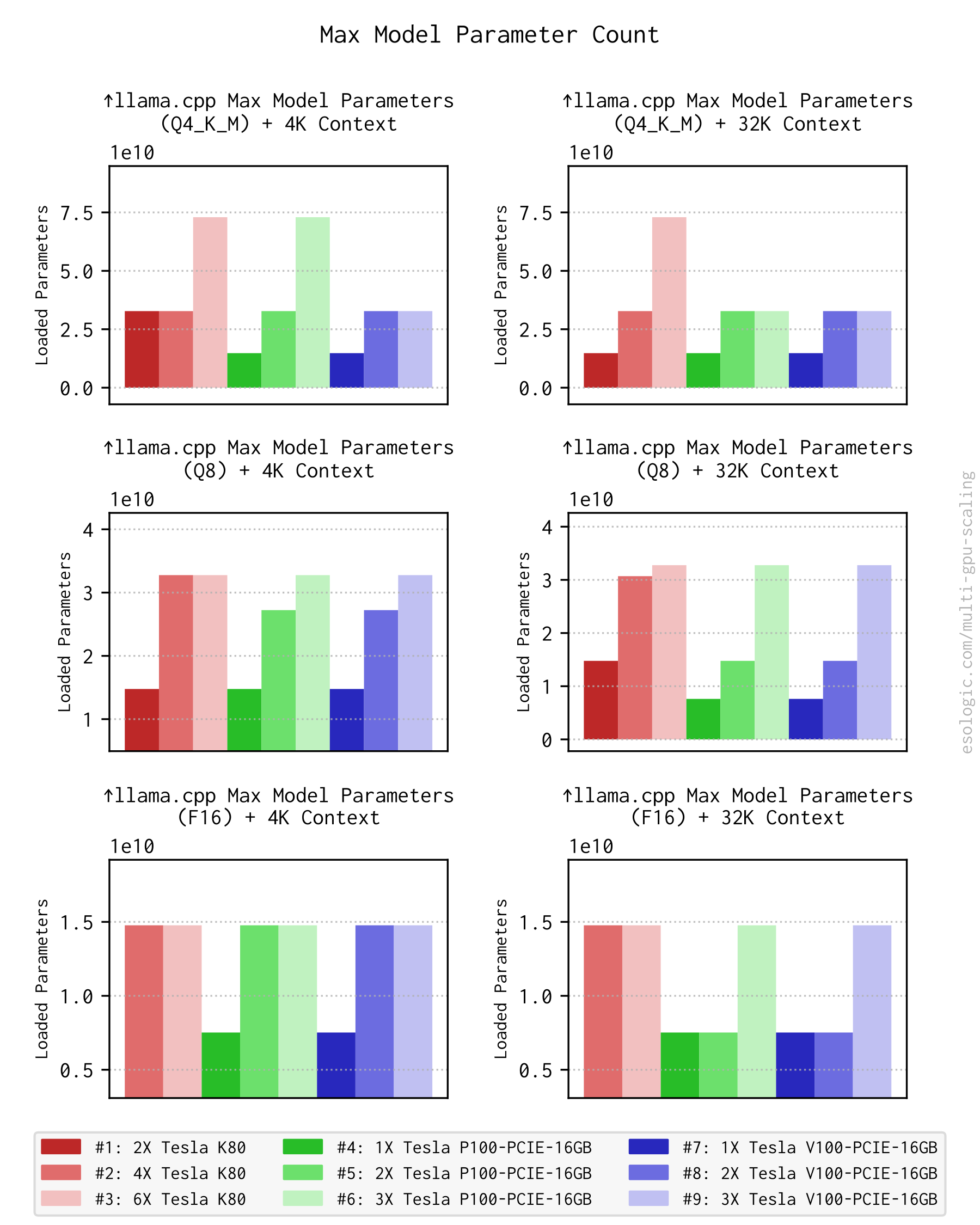
This result shows that both 3xK80 and 3xP100 are able to at least get some tokens flowing out of 72B parameter models. Previously I’d concluded that our old friend the K80 was really and truly dead but it may still be useful to very slowly evaluate huge LLMs. One could theoretically use risers to get more than 4 K80’s in a system to this effect, but I don’t think this is something I’m going to try anytime soon. My goal is still a standalone 4U GPU Box for the rack.
Obviously context depth and quant are competing for the same VRAM but it is interesting to see how the two interact here. If your application can get away with a tiny 4k context window and you only have two 16GB GPUs (P100, V100-16GB), your model can make the jump from ~15B parameters all the way up to 32B.
LLM Throughput
In the different discussions (/r/homelab, /r/LocalLLaMA, hackernews, level1forum) of the previous post, many people wanted to see a spread of model sizes, quants and context depths. The set of models I landed on were:
- Requested by name.
- Available in the four common quants.
- Reasonably sized.
For each model family the plots below are for generation tok/s as last time we found that prompt processing was consistently much faster to the point it was an afterthought.
The plots themselves are on carousels so make sure to swipe to see the results for the different model sizes.
Qwen 2.5
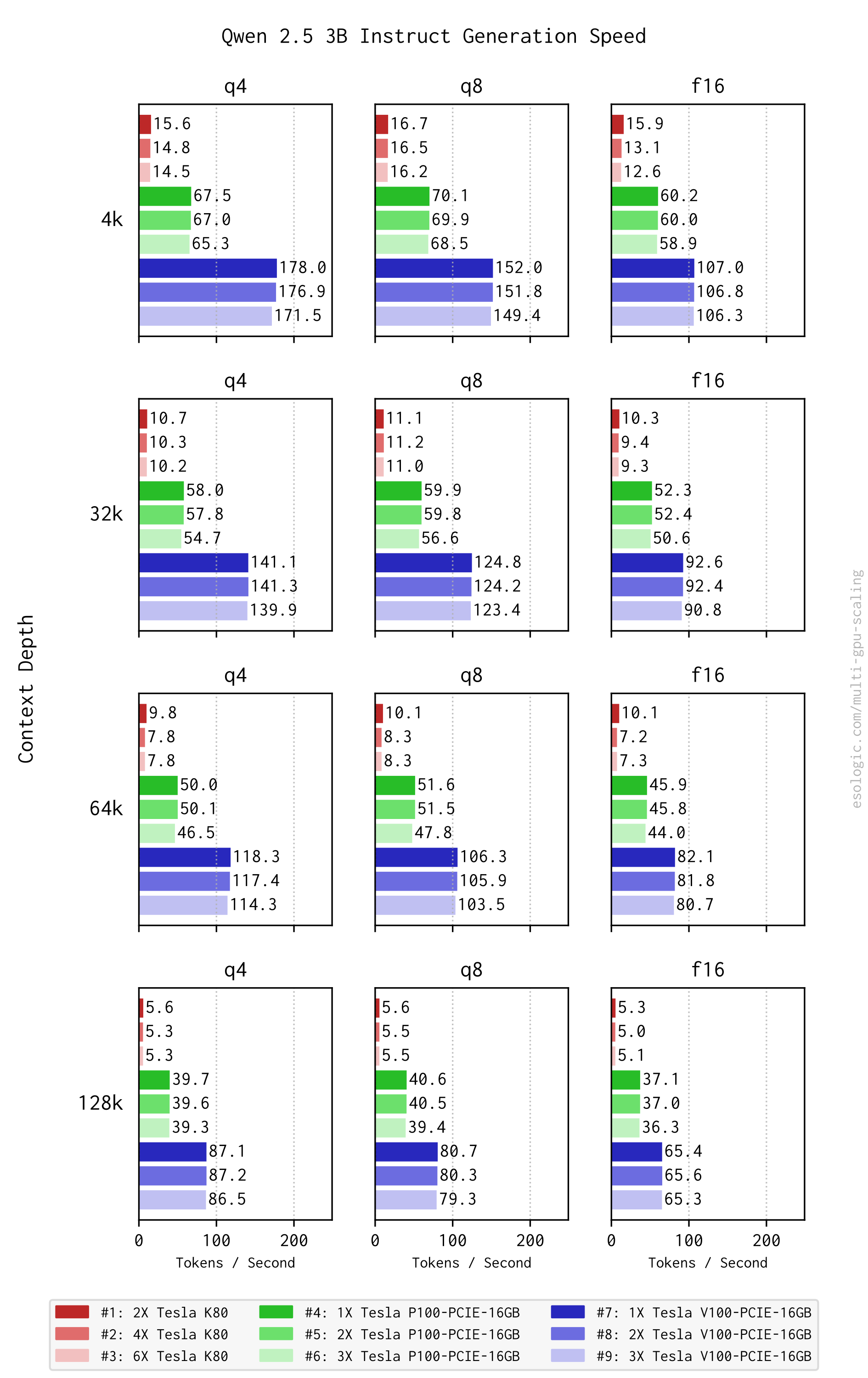
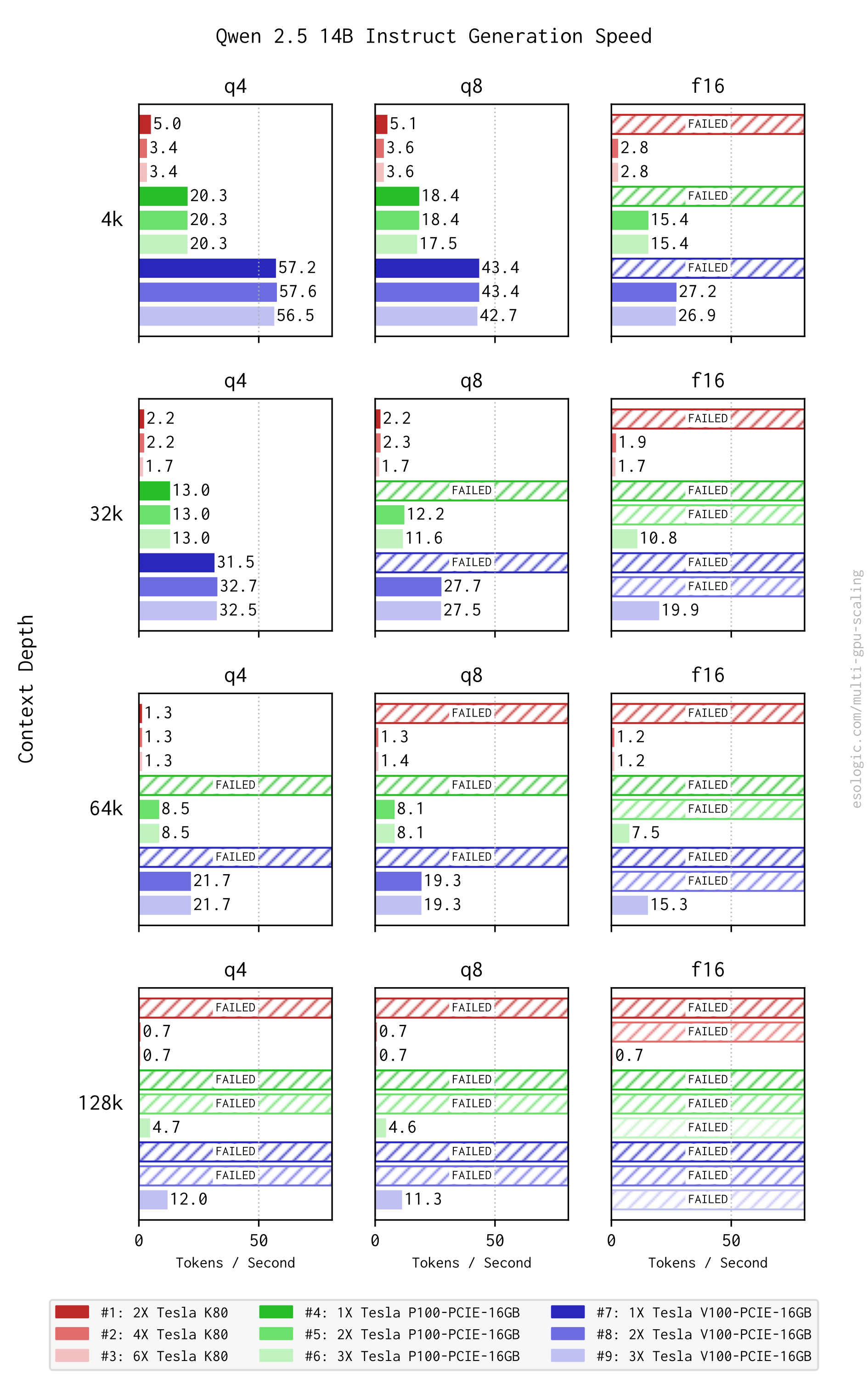
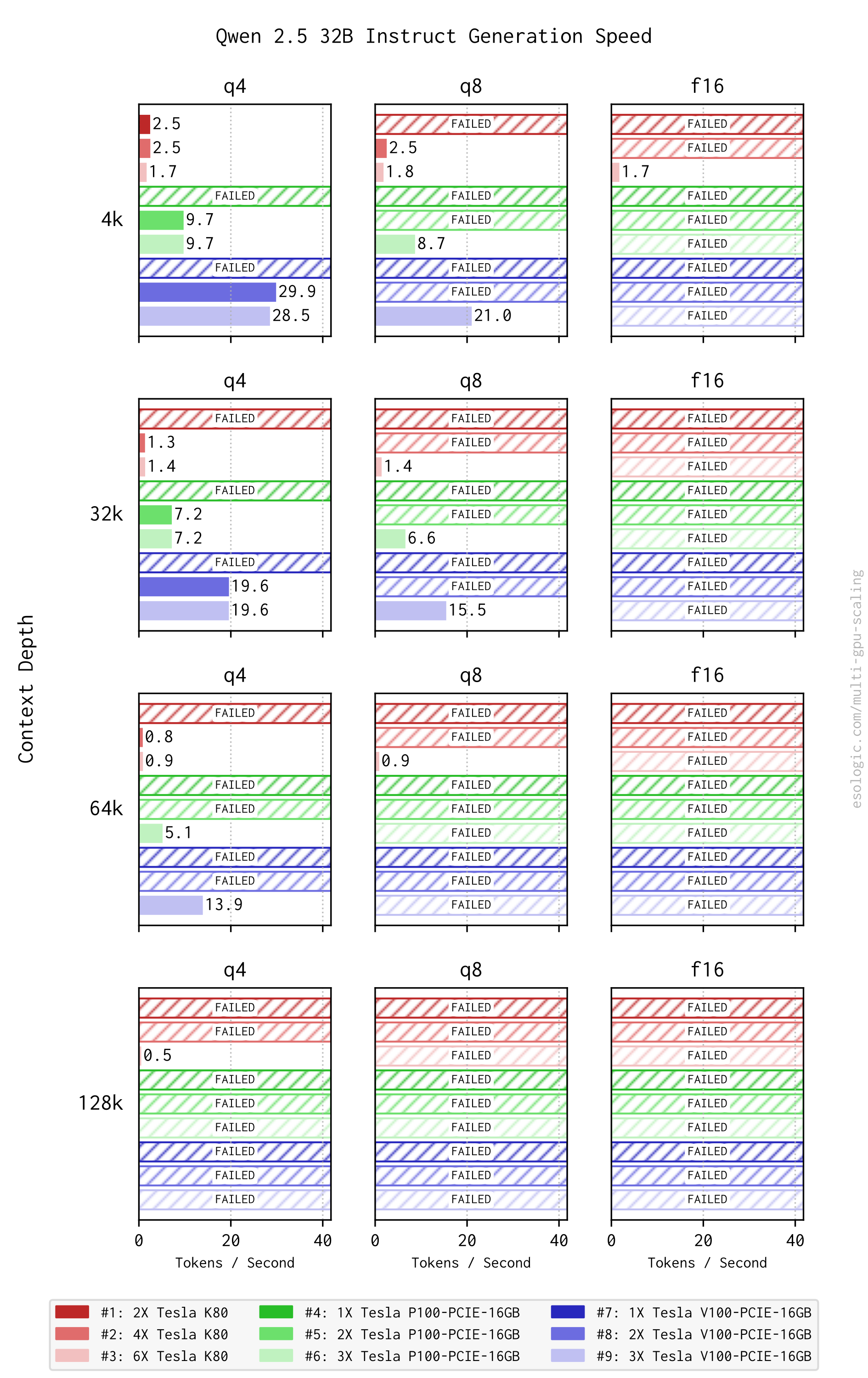
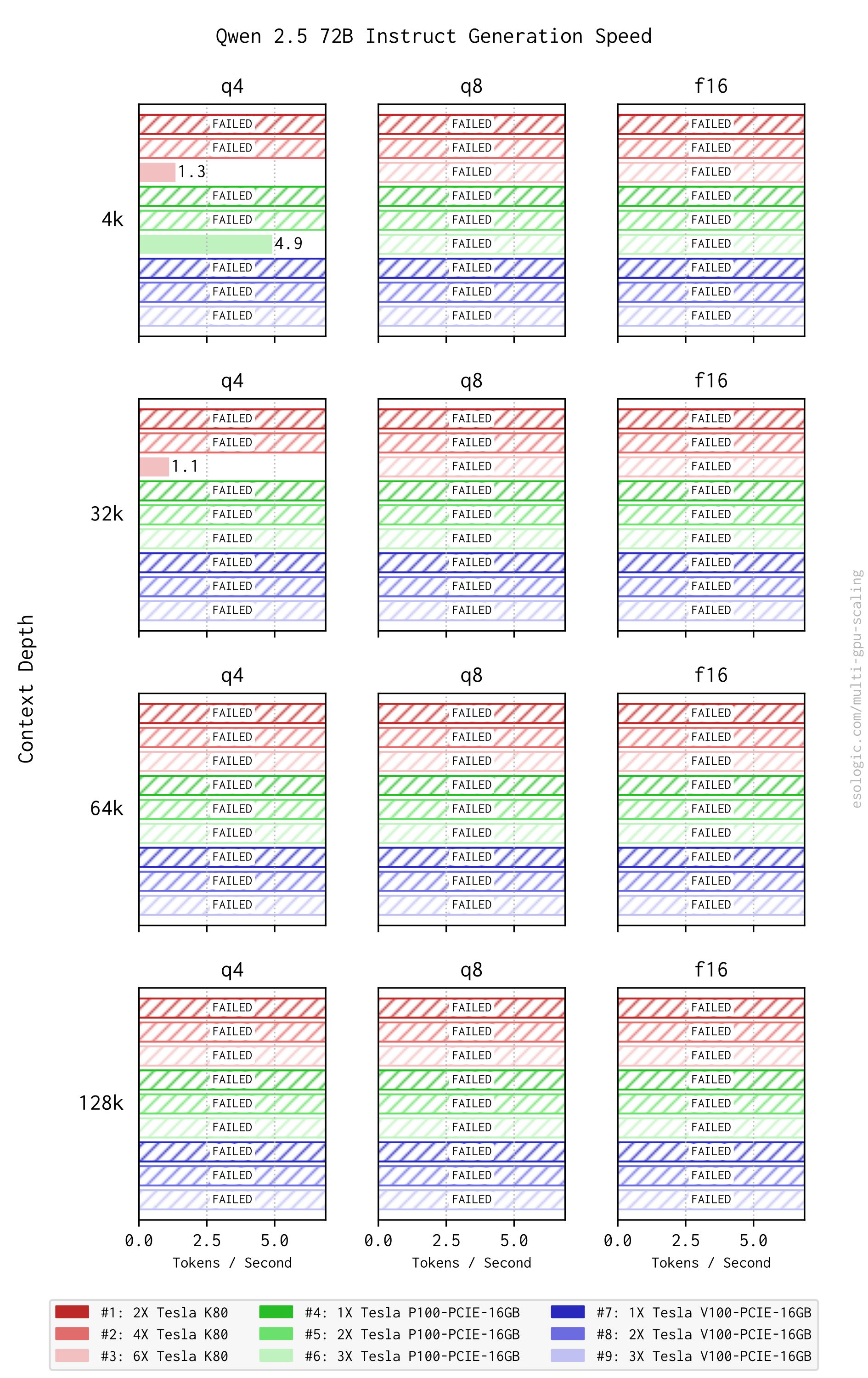
Qwen 2.5 3B @ 4K context depth is the lightest load we’ll be discussing in this post and it sets speed records for all configurations. A single V100-16GB can do 178 tok/s, a single K80 can do 17 tok/s.
Only the P100s and the K80s can use Qwen 2.5 72B, only the K80s can use a 32k context depth. Restating my previous point, 1-5 tok/s is more of a party trick than anything serious.
Gemma 4
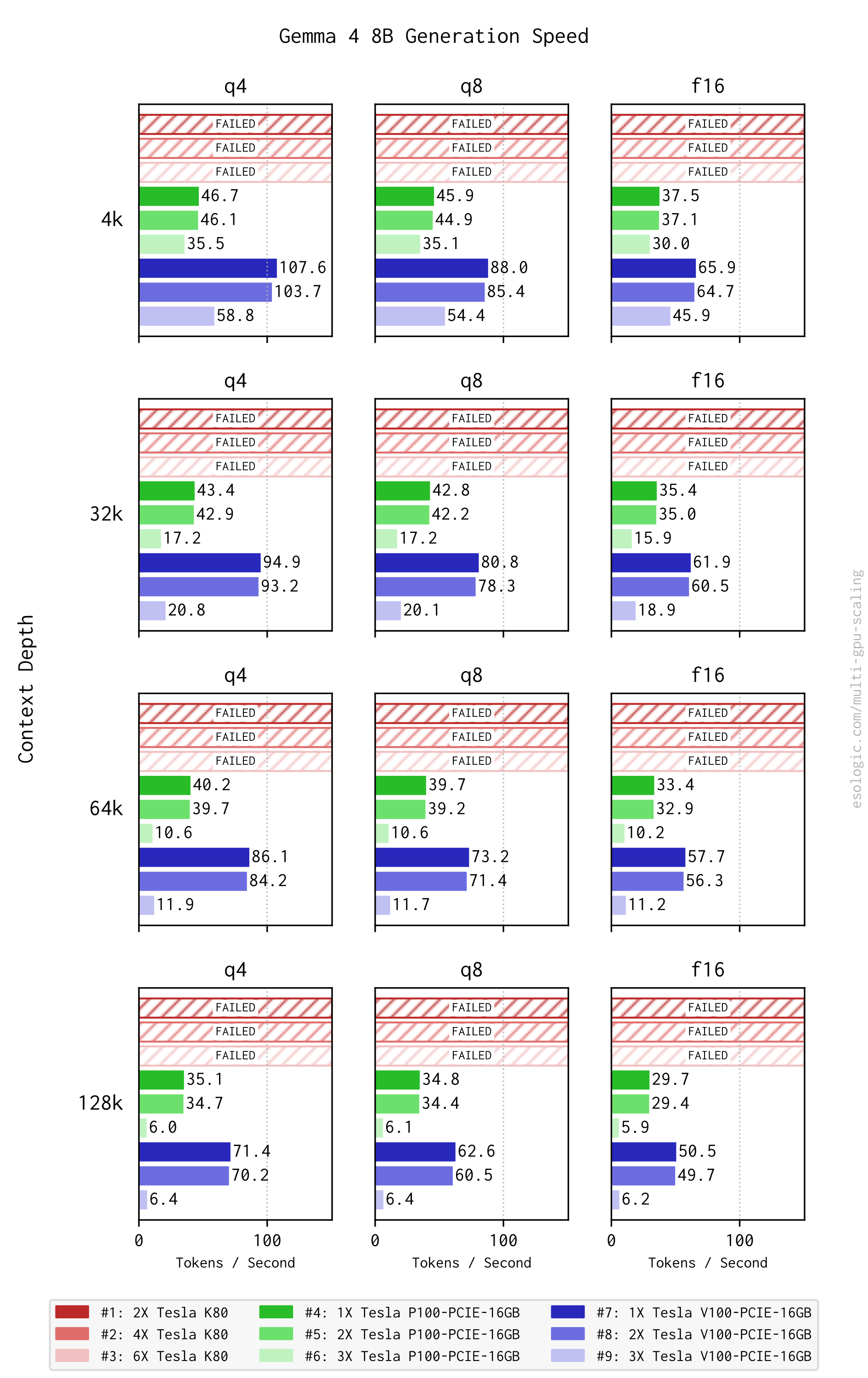
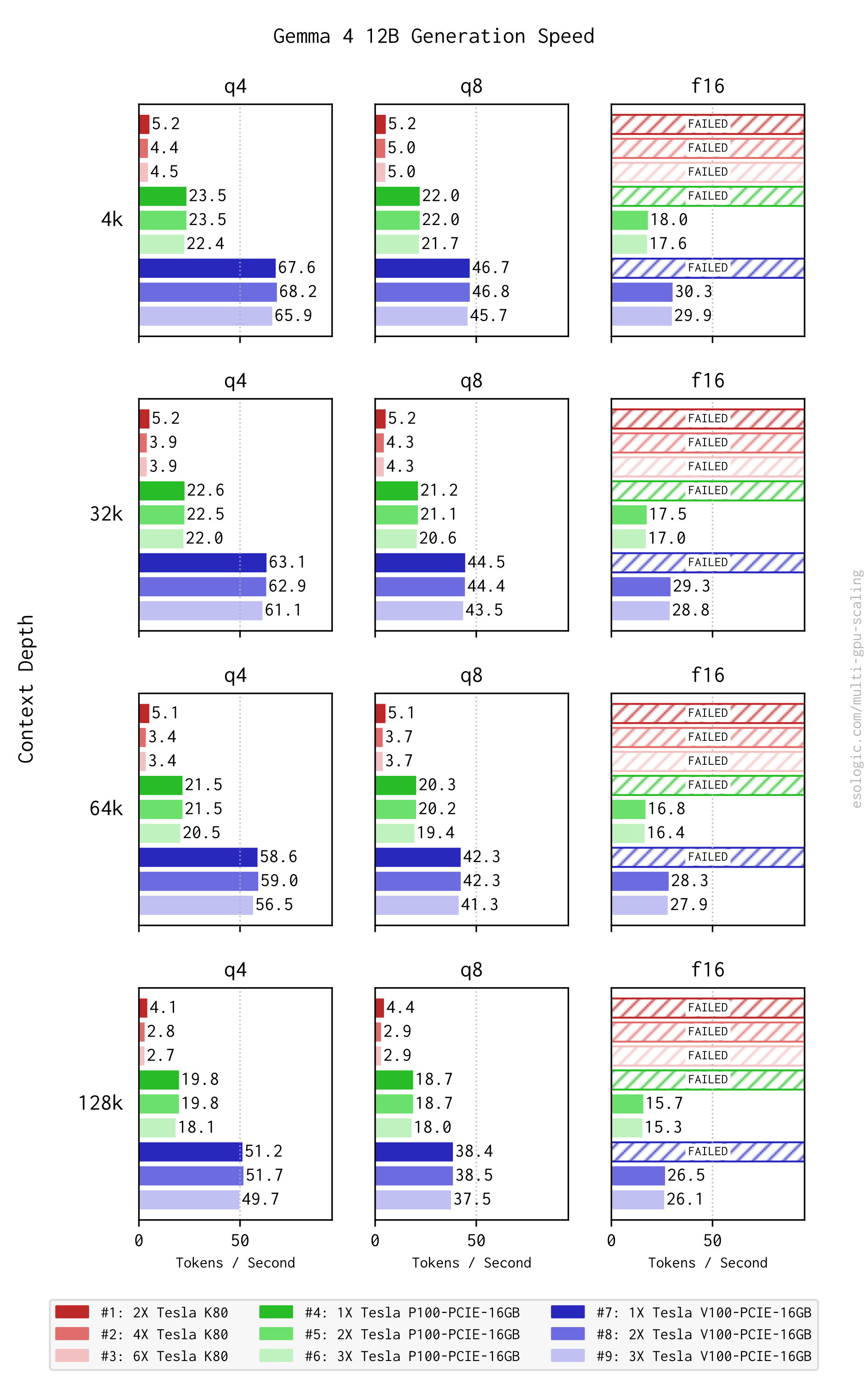
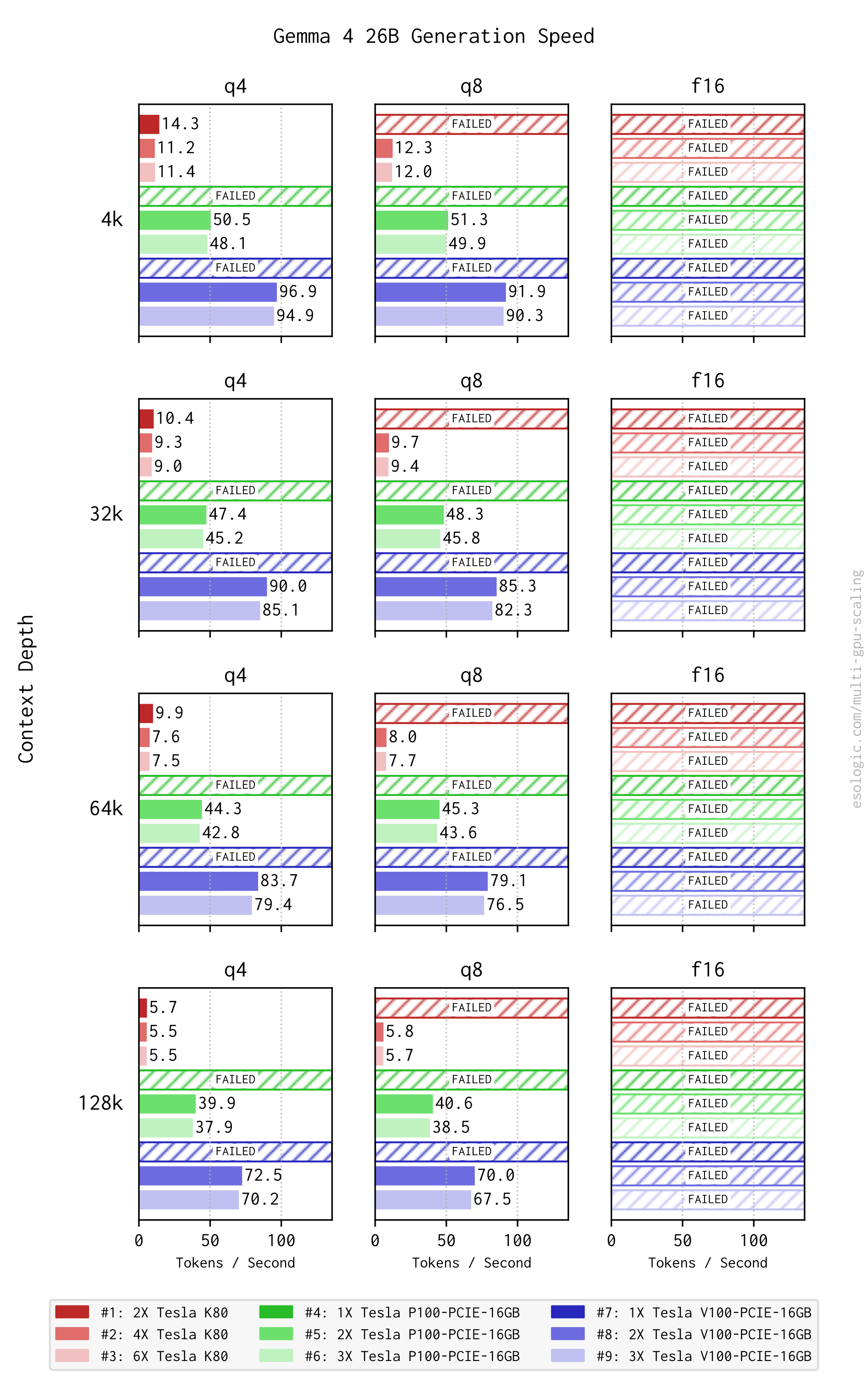
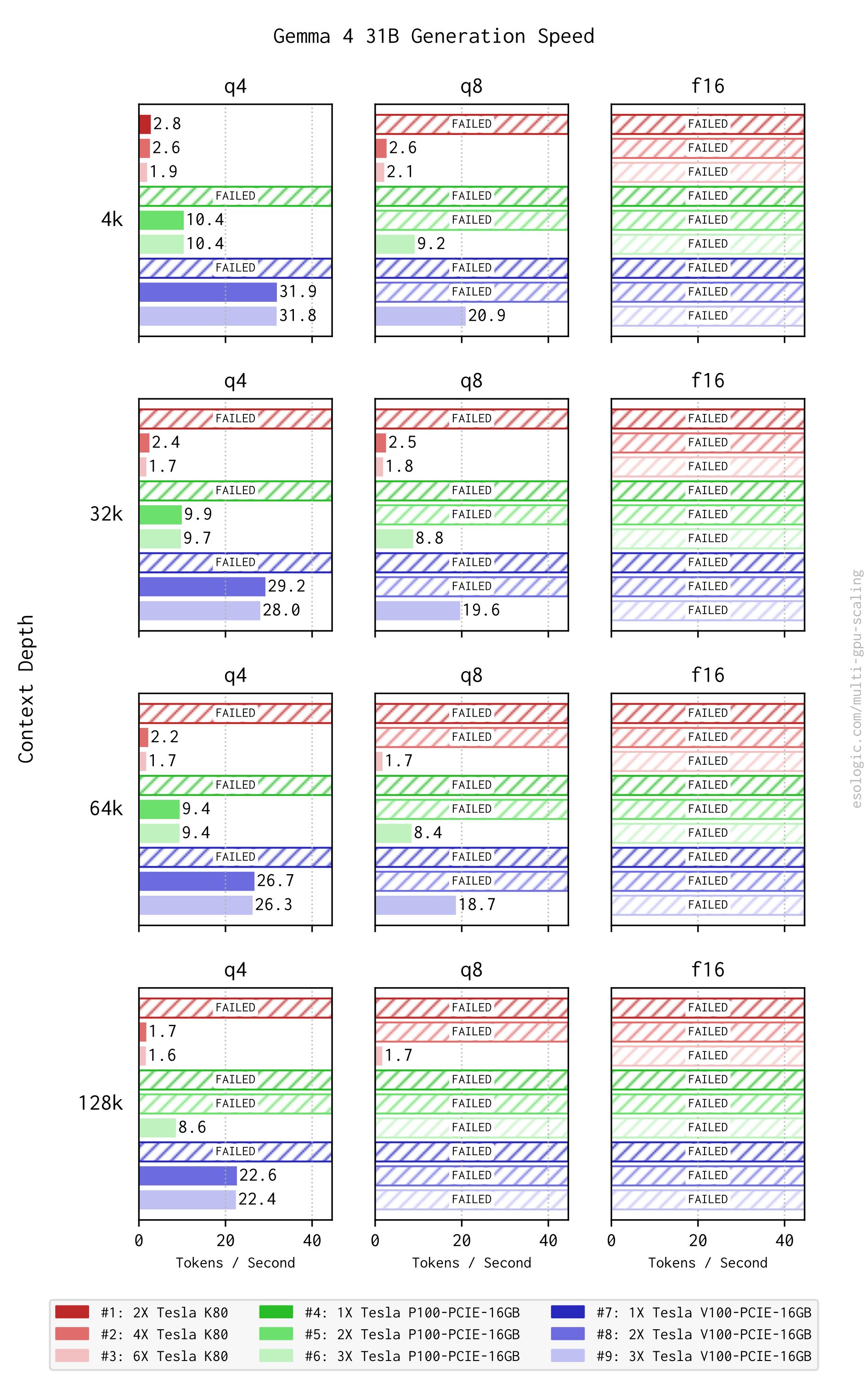
Gemma 4 8B performs very strangely compared to other models in the series and compared to the other model families benchmarked. No K80 build is able to produce tokens. I also double checked this and I get an OOM-ish message failure mode similar to other failures.
Additionally, Gemma 4 8B has a serious diminishing returns effect when going from two to three cards. No other model tested here has that dramatic of an effect. The effect is typically ~5 tok/s, not ~60 like we see here.
Gemma 4 26B strikes me as a “fast” model. Looking at the Q8 quantization at 128k context depth, 2xV100’s produce 70 tok/s where under the same parameters they get 80 tok/s from Qwen 2.5 3B. 10 tok/s is a small price to pay for that much of an increase in effectiveness in my opinion.
Gemma 4 31B is another case of the raw VRAM capacity of the 3xK80 config is able to produce some very slow output where the other cards cannot.
The fact that you can get max quant and context depth on multiple models in the series (8B, 12B) on two cards is also worth noting.
Qwen 3.6
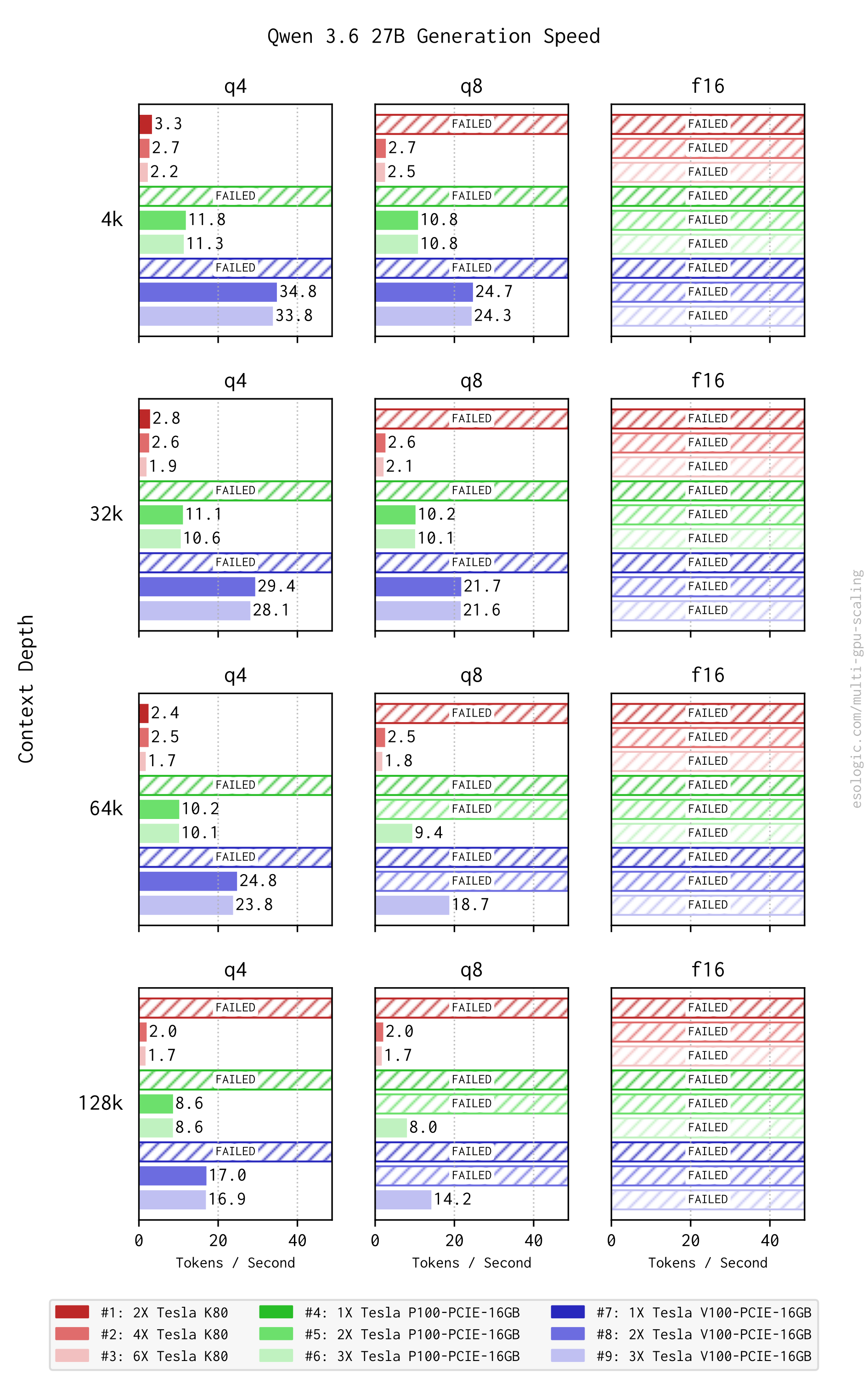
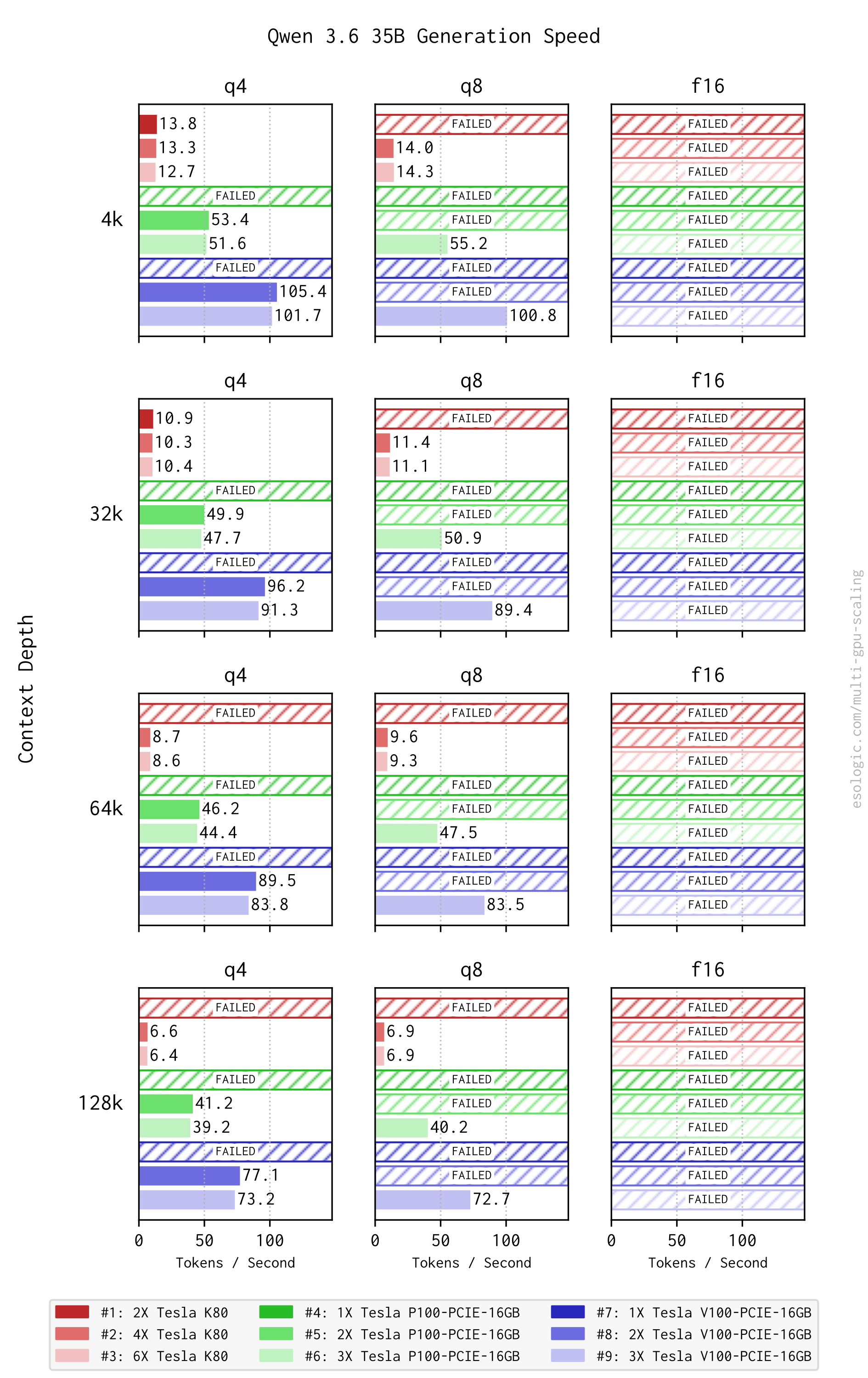
As of writing, I am daily driving Qwen 3.6 35B on 3xV100’s. The 70+ tok/s is pleasant to interact with, and the model is usable enough for me to get work done. This is the first time I’ve stuck with a local model for more than a month or so, and I actually think it performs on-par with the API models unharnessed.
Even though hardware prices are fluctuating right now, you can still assemble a full setup — GPUs, motherboard, CPU, and cooling — to host Qwen 3.6 35B for around $1,000. In my book, that’s a fantastic deal for unlimited usable tokens.
Overall, Qwen 3.6 is a bit more demanding than the others. You can get somewhat usable tok/s out of two cards but will likely want three for Q8. F16 is completely out of reach even at the smallest context depth.
Split Mode Tensor
It was shown conclusively last time that adding more GPUs does not increase throughput. I am aware of ik_llama, but haven’t integrated full into gpu_box_benchmark because my initial testing only showed marginal improvement on older cards and I wanted to keep the total number of tests in the benchmarking suite down.
igormp pointed out that we could use llama.cpp’s new tensor split mode to hopefully get some performance uplift when using more GPUs: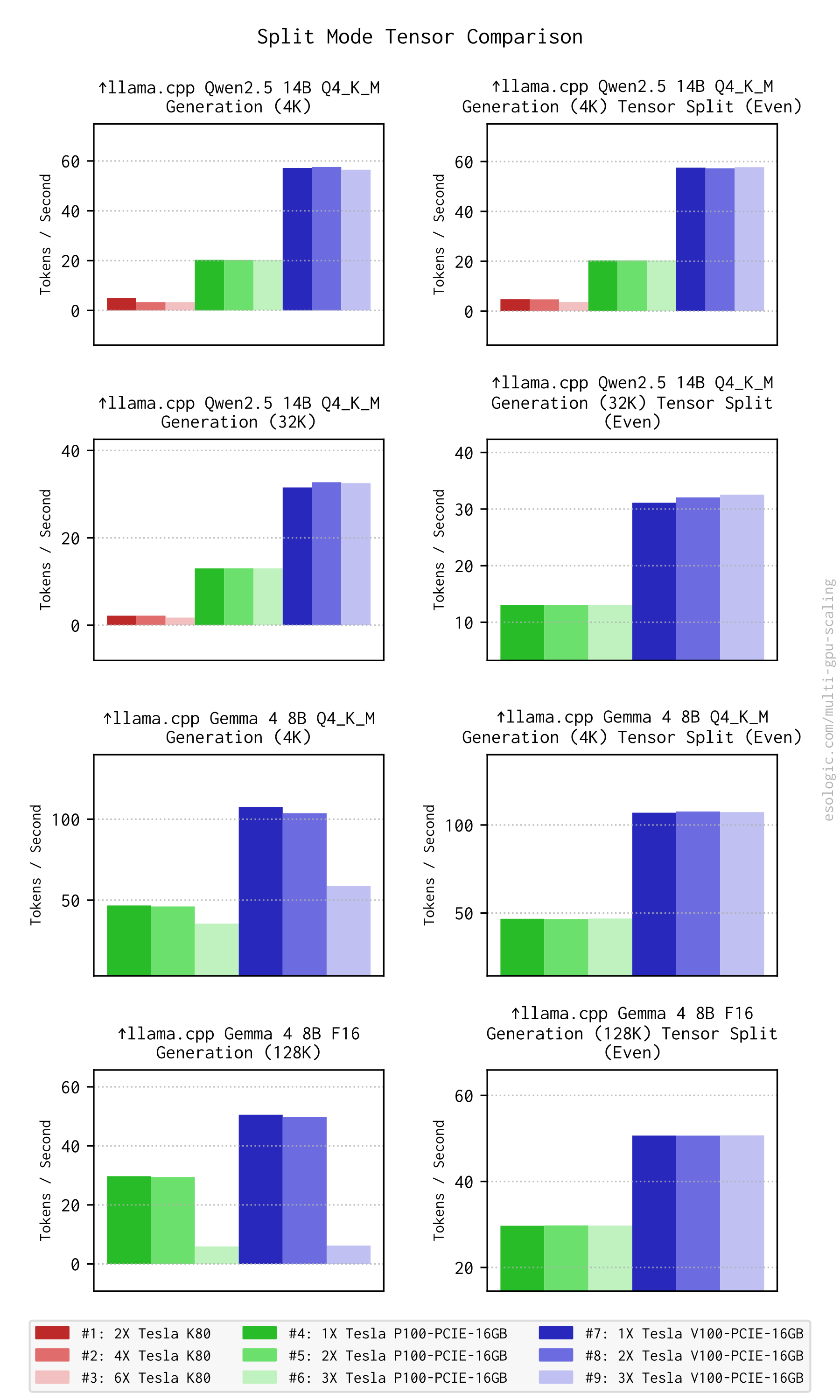
There are some gains here, particularly with Gemma 48B (which I have already described as performing strangely), but they’re marginal gains.
LLM Conclusions
My personal threshold for realtime interaction via something like openwebui is a generation rate of around 70 tok/s. So, across the different model families (two for Gemma 4 because of the performance range), let’s look at how much model we can get at this rate with the 3xV100’s: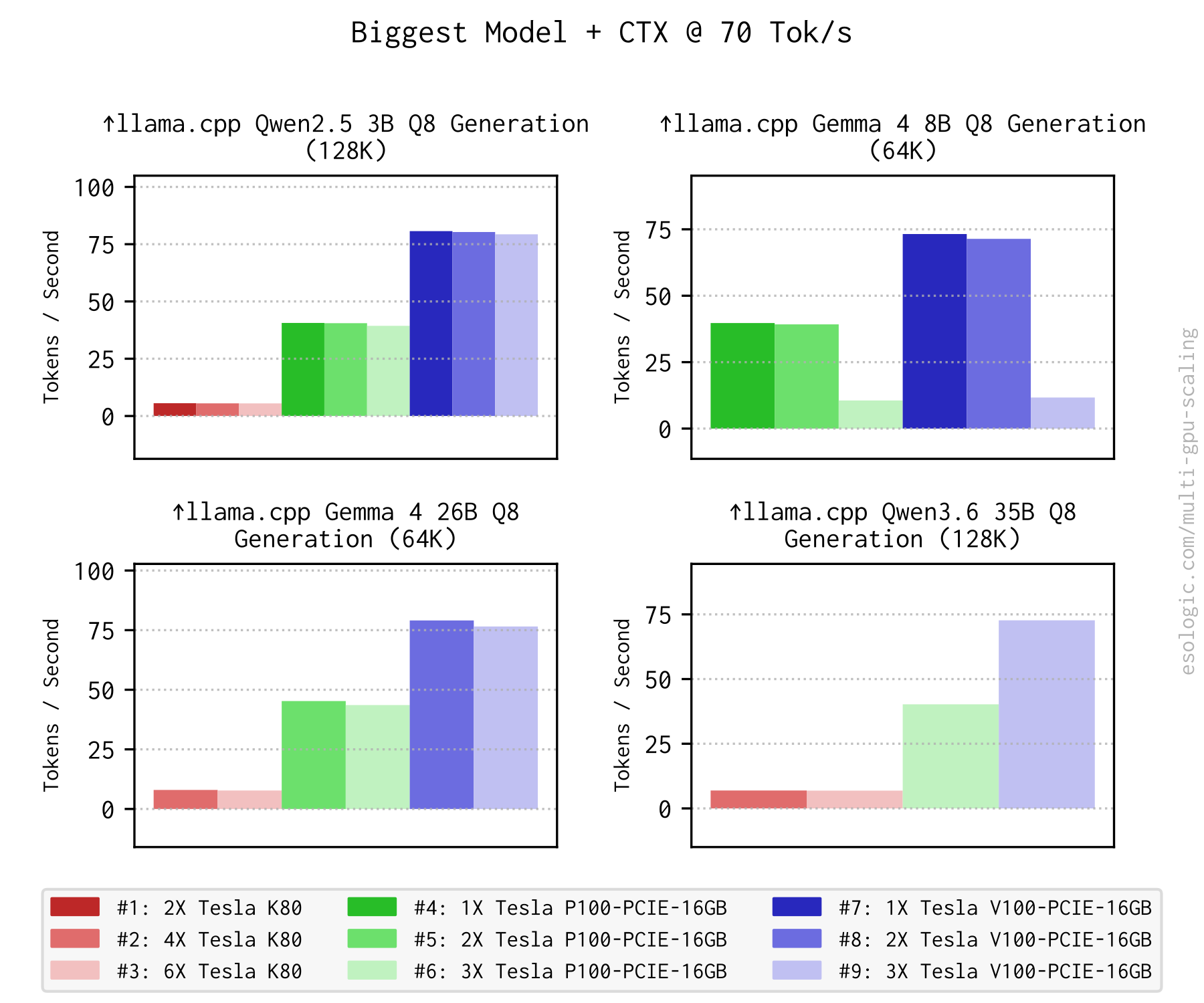
Interesting here that even across models the shapes of these graphs are so similar.
The P100 builds only achieve the 70 tok/s mark with Qwen 2.5 3B Q8 @ 4k ctx, the smallest of the models evaluated here. Still though, projects like OpenHands put downward pressure on raw tok/s output for the home user. If you have a process somewhere constantly prompting models and collecting the output 24/7, it doesn’t matter how fast the instantaneous output is.
Let’s put this all in context though.
GitHub user Kleybrink did some benchmarking work for the DGX spark, with its MSRP of $4700 and found that its Qwen 3.6 35B Q8 generation performance was only 45.8 tok/s. I also found the same model benchmarked on an M5 Mac Studio (MSRP $2500) at a generation speed of 43.9 tok/s. Compare these both to the 3xV100-16GB build above which did 72.7 tok/s. We should remain unafraid of this older hardware.
Comparing Modern Cards
Something I wasn’t able to do last time was benchmark a modern server GPU (unless you count my mysterious T40) against our secondary market favorites. Luckily, after my previous post, Parasail reached out and offered to sponsor such a comparison. I was able to use several of their dedicated deployments to get access to some really expensive cards. The H100 SXM5 and B200 SXM5 are both retail unobtanium, with the occasional street price of over $30k occasionally popping up. How do they do?
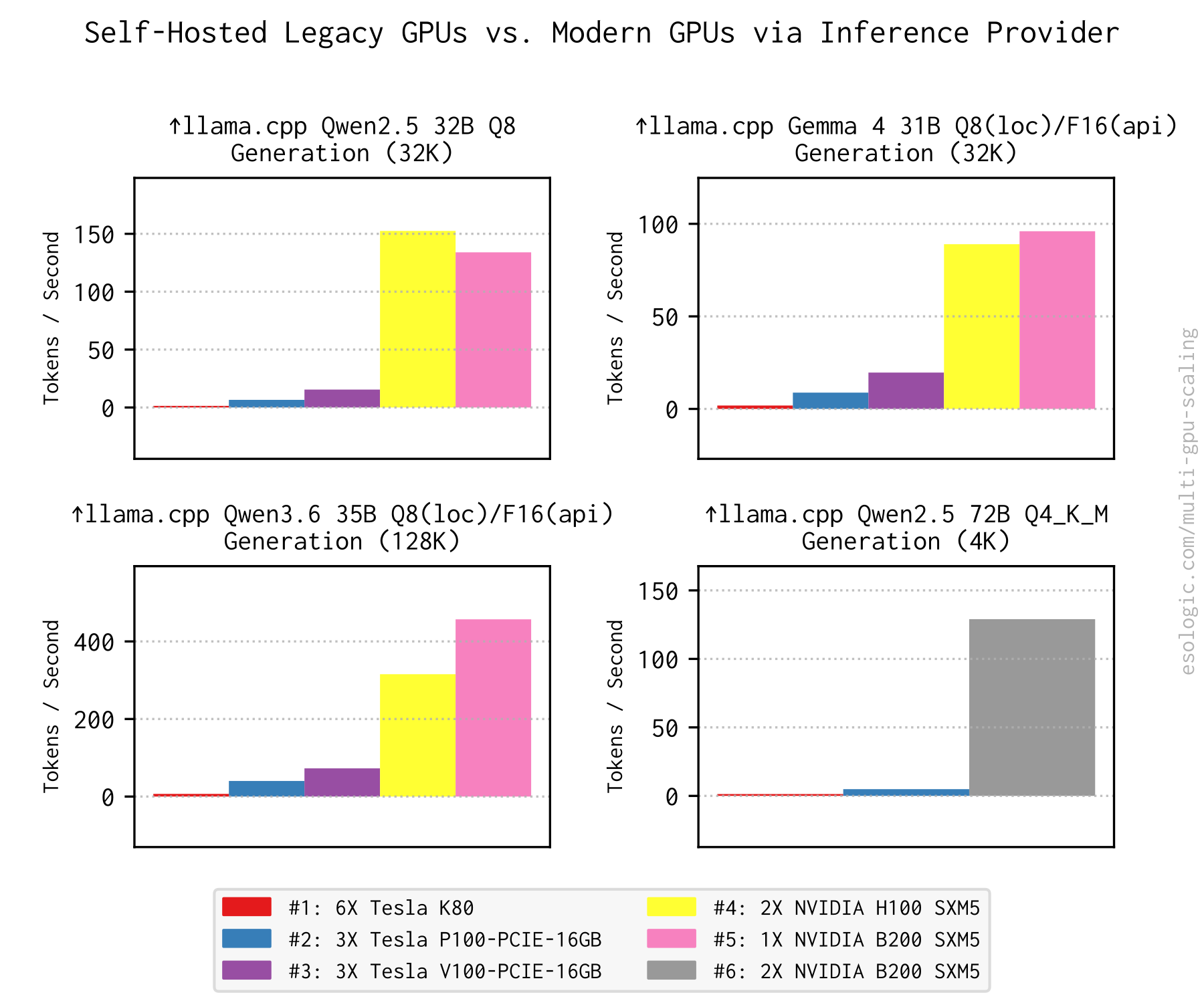
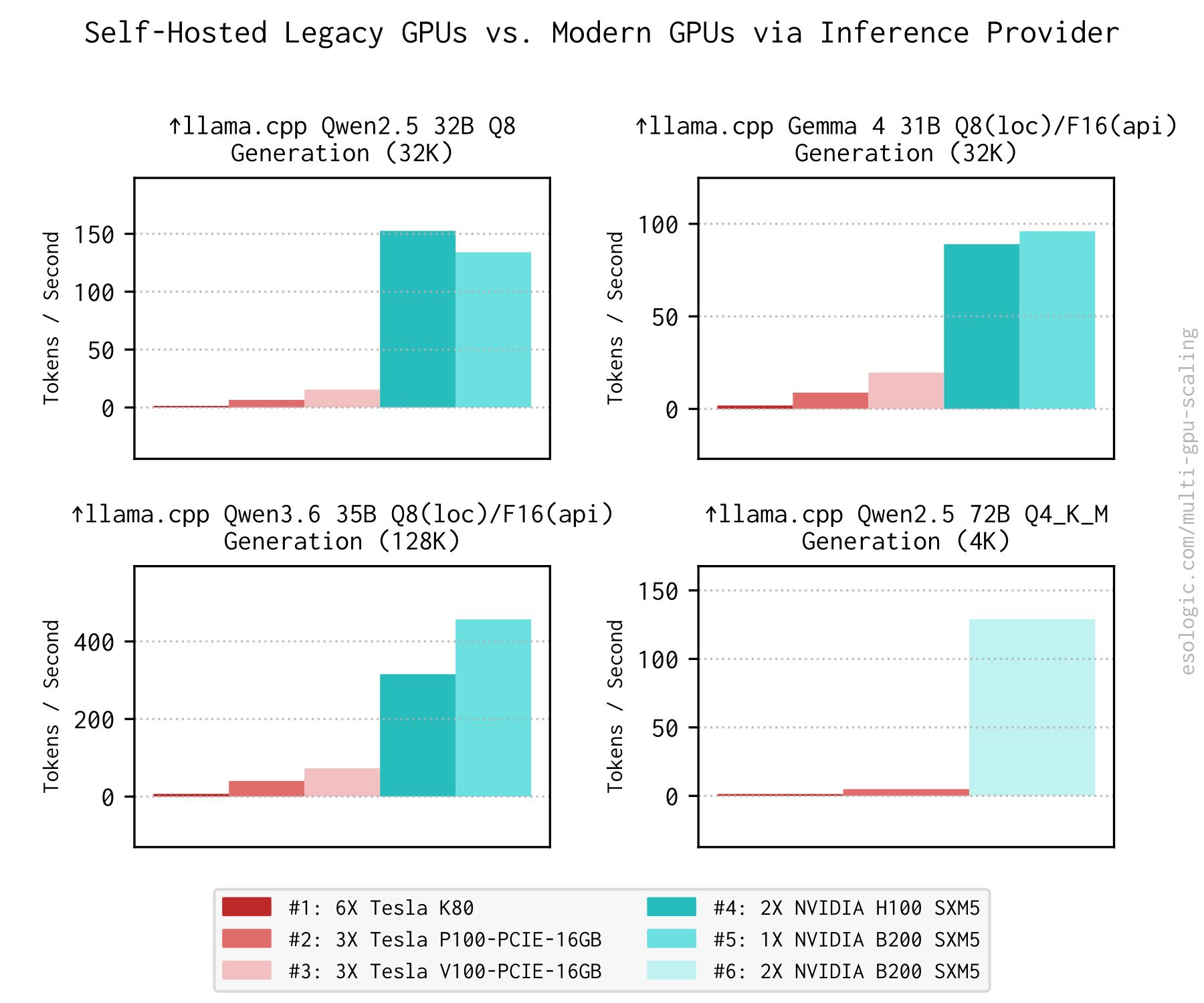
Surprising no one, these modern cards destroy our decommissioned equivalents. To me, the 72B model result is the most striking mostly because of how truly prehistoric it makes the K80s look.
It is a matter of perspective. Parasail and other inference providers are in the business of enabling people to make applications at scale. My goal here in looking at these old cards is to understand what is needed to make a single user more productive. This is how things break down from my point of view.
Inference Providers (e.g., Parasail):
- High-Volume: If you are building an app that will serve thousands of users simultaneously, providers offer the scale and redundancy needed to keep it running.
- Cost Efficiency at Scale: For public-facing APIs or heavy usage, paying a premium per token is often significantly cheaper than buying and powering enterprise GPUs yourself.
- Maintenance-Free Scaling: Offloading hardware failures, driver updates, and infrastructure scaling to specialists so you can focus on your app.
Self-Hosted LLMs (GPU Box we’ve been researching toward):
- Single-User Productivity Tools: If you are building a tool just for yourself or a small team (like me), the marginal cost of used hardware is often lower than paying per-token forever.
- Control: When sensitive data must never leave your local network.
- Experimentation: Utilizing decommissioned hardware to experiment with open-weight models without needing a budget for an H100.
Power Consumption
Back to local benchmarking. Power consumption is another commonly cited drawback of this older hardware. Let’s first look at some non-LLM GPU box usecases as a follow up from last time.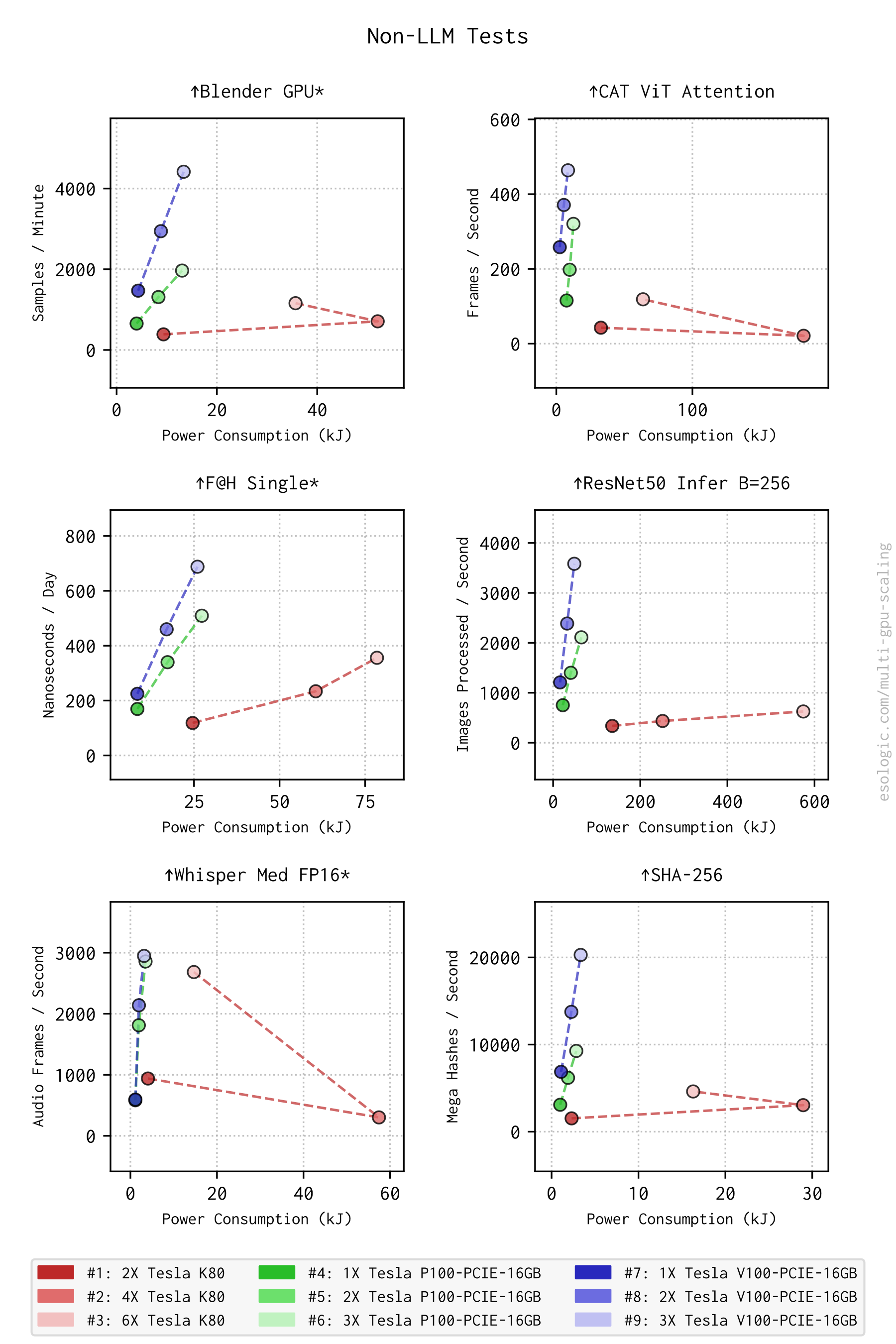
The power consumption of the K80’s is very strange in a few tests here. For blender, CAT, Whisper and SHA-256, two K80s consume significantly more power than using three cards and still perform worse. This is likely due to the fact that the runtime of the test is longer with two cards than three so the total area under the curve (Joules here not watts) is larger.
The P100/V100 results reflect the expected efficiency gains across generations. V100-16GB can put up better scores while consuming less energy.
You may notice a lack of Maxwell cards in this post. After the previous benchmarking effort when it became clear that Maxwell cards wouldn’t work well for modern LLMs, I decided against purchasing more. I already had the K80s, P100s and did opt to buy two more V100-16GB cards. However, I did re-run the full suite on an M60 to check compatibility, so we can also see single card generational performance increase with Maxwell in the mix: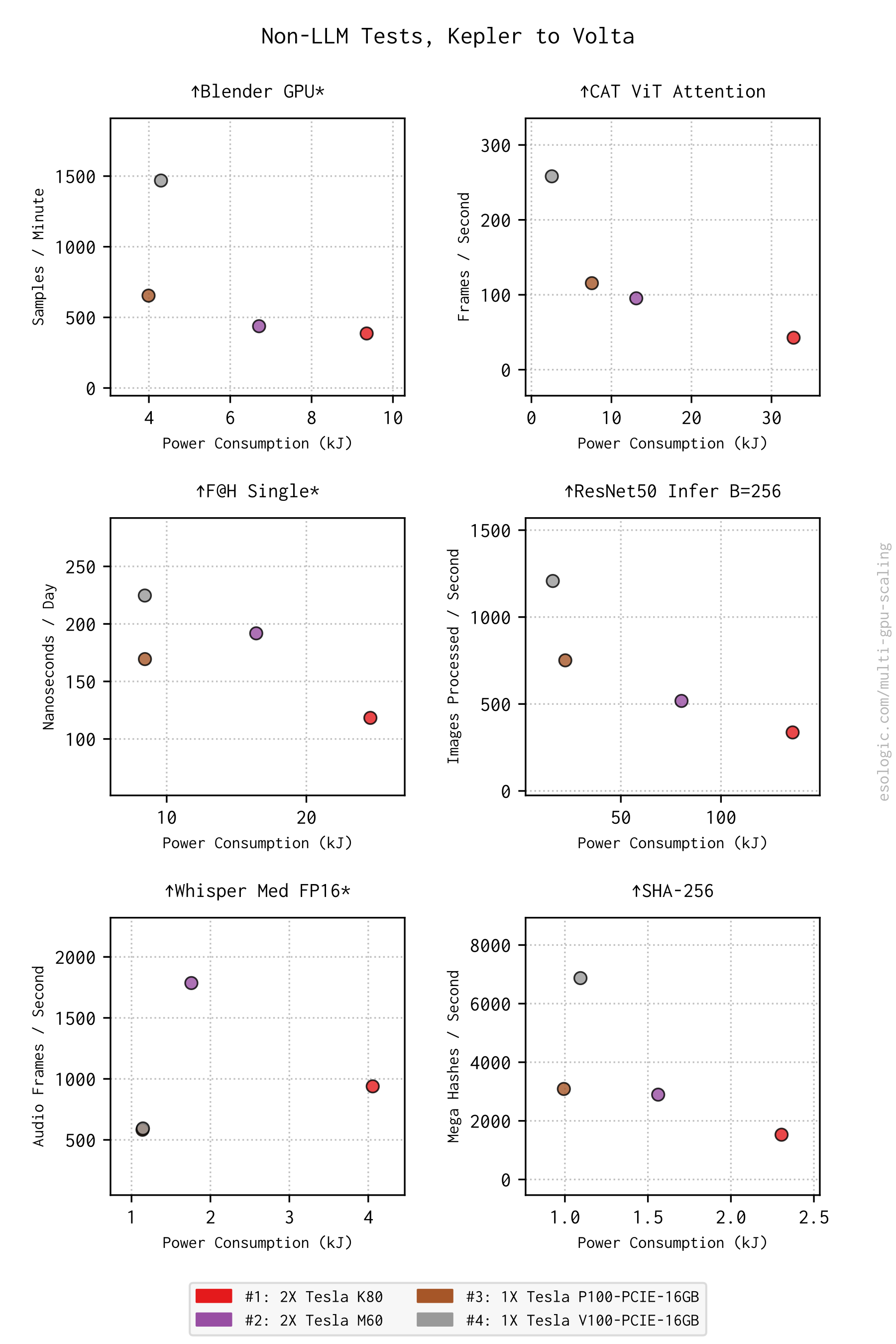
M60 is still the Whisper FP16 dark horse. It’s also interesting here that V100 always wins on score but is looses in a few tests on power.
Looking back at the 70 tok/s graph from earlier in power mode is pretty interesting as well: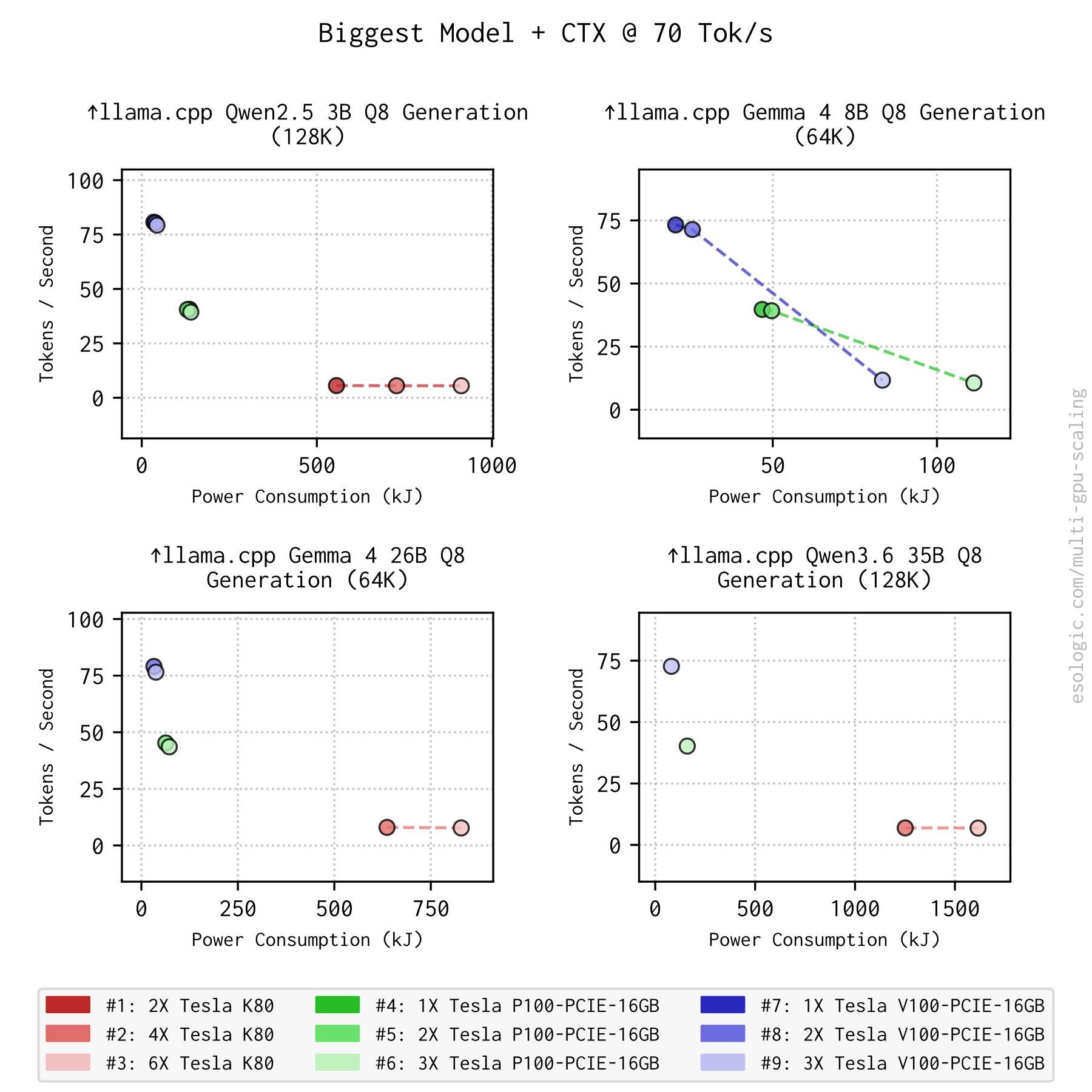
Even though we’ve shown adding more cards doesn’t increase throughput performance for a given model, this result shows that it doesn’t increase power consumption very much either for P100/V100. Gemma 4 8B violates this trend of course.
Conclusion and Next Steps
This was expected but is now clear given the data: throwing more decommissioned GPUs at an LLM won’t magically double your throughput, but it can get you larger models. The real challenge is matching your hardware with a model.
For daily driving a capable local model on a budget, three used V100-16GB (~$1K total) remain the sweet spot. They comfortably clear my ~70 tok/s threshold for Qwen 3.6 35B at practical context depths, outperforming $2,500+ commercial setups while drawing significantly less peak power than the P100s.
This round of benchmarking proves again that these “e-waste” the X99 platform + retired GPUs can be strategically competitive. The silicon cycle moves fast, but 7B to 35B parameter models run equally well on a 2019 Tesla as they do on a $4,700 DGX. As compute costs climb, having a reliable, self-hosted fallback can be an insurance policy against vendor lock-in or a way to work without burning through API quotas.
The next thing I would like to look at is creating a benchmark to add to the suite that maps to “software factory” performance. My read is that this will become more important in the coming months and as the self-hosted OSS side of the equation improves I’ll be on the lookout to see how things shake out once the realtime interaction requirement is relaxed.
Again, for people inspired to get into this world of decommissioned enterprise GPUs, the biggest problem I’ve run into is related to cooling and there will be a lot more related to that in the coming days. Join the mailing list to sit in the front row.